
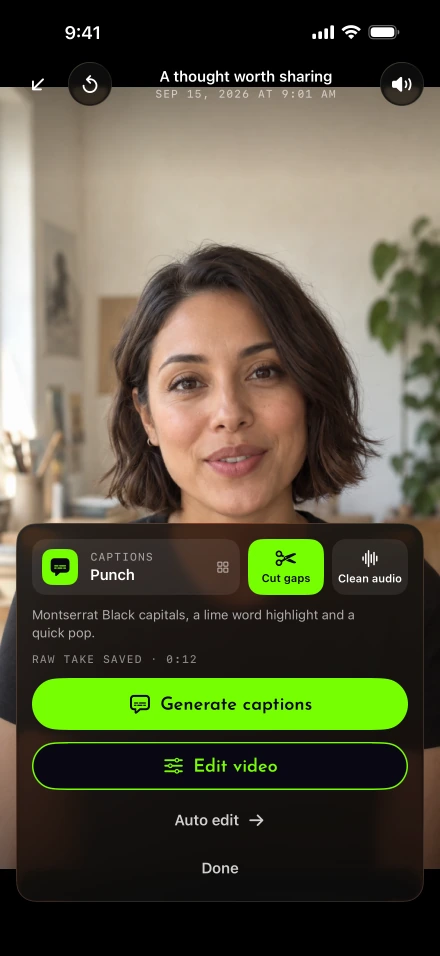
Finishing the delivery is one decision; choosing the final rhythm is another. Auto edit makes a starting cut from the recorded take so you can spend your review on whether the explanation still sounds right. It belongs between recording and the detailed video editor, within the wider Lightshot feature set.
What does the auto edit change?
It cuts silences and adds captions, plus any optional change you switch on. In Settings › Auto edit, choose the caption style and whether to cut silences. The initial setup uses Punch captions and has silence cutting on. Remove filler words (beta), Zoom in at cuts and Use brand start off. These switches are choices about this kind of video, not rules that every recording should follow.
Record or import the take, then tap Auto edit on review. The processing screen says it runs on this iPhone and provides Cancel. It does not start itself after every recording, and there is no promised completion time.
How does it decide what counts as silence?
It measures loudness in 20-millisecond windows against the take’s own noise floor, so a quiet room and a busy one are judged differently. Gaps shorter than 0.35 seconds stay, and each kept stretch keeps 0.1 seconds before the voice and 0.15 seconds after it. Review reports the amount of quiet time removed. Our silence-cutting guide explains why a purposeful pause still deserves a listening check.
A pause after an instruction can give the viewer time to act. A pause while you search for the next line may simply interrupt the explanation. The audio level alone cannot distinguish those intentions. Play the first cut at normal speed and adjust the pieces when the thought needs more room.
For a mistake you notice while filming, redo the sentence before finishing instead of asking silence removal to repair the words. When batching a series, the session guide separates performance checks from the final edit.
Are the captions made on the iPhone?
Yes, from what the iPhone heard in the recording. The caption pass uses Apple’s SpeechAnalyzer and an on-device fallback where available. Apple describes the main model’s local speech processing and the downloadable language assets it uses. Your script helps with spelling and punctuation only when it agrees with the speech. Ad-libs remain part of the recognized audio; skipped script words are not inserted.
If nothing is recognized, the app tells you rather than supplying invented timed text. Check the language available on this iPhone and inspect the recording. You can correct the result through Edit all in the caption tools.
W3C describes captions as including meaningful non-speech sound as well as speech. Lightshot’s generated captions cover recognized speech, so an automatic pass alone is not a claim of complete accessibility. DCMP’s guidance on caption placement also helps when your chosen style hides a name or a face.
Does it remove filler words like “um”?
Only if you turn on Remove filler words (beta), which is off until you choose it. Filler removal is beta and uses an English list of sounds such as “um” and “uh.” It protects those words when they are written in the script, and removes restarts only where the script supports the decision. Enable it on a take you can review carefully; expressive sounds and hesitation may carry meaning.
Zoom at cuts alternates a gentle face zoom so a jump cut can read as a changed shot. Use brand applies the kit you set up: colors, a corner logo or name tag, and optional opening and closing cards. For business updates, check that the card does not delay the useful first sentence.
Finish by comparing the result with your intention
Clean audio is separate from silence cutting. It reduces background noise on the device while keeping the original audio; optional automatic noise cleaning begins when review opens only if that setting is enabled. It cannot replace a usable microphone recording.
Demo takes preserve the screen sequence by skipping silence cuts and zoom at cuts. For ordinary camera takes, finish with a complete playback before you render the final export. Check the joins, captions and first and last words of each passage, keeping the edits that serve the message.