
A captioned explanation should remain understandable when the listener needs to read it. That starts with accurate words and enough room on the screen, before the choice of font or animation. Lightshot’s recording workflow produces captions after a take, with the same tools available for videos imported into Takes from Photos or Files.
How does Lightshot make captions?
It transcribes the recorded speech on the iPhone after the take, then times each word to your voice. Tap Generate captions from review, or include captions in an auto edit. Speech recognition runs on the iPhone. If the recording produces no recognizable words, Lightshot says so instead of building timed text from the script. Confirm the selected speech language and listen to the source recording when a result is missing.
Open Edit all to correct the wording, or Transcribe to regenerate captions. Check names, numbers, contractions and any passage where you ad-libbed. Your prepared script is used for spelling and punctuation only where it agrees with what was said; it is not a replacement transcript.
How many caption styles are there?
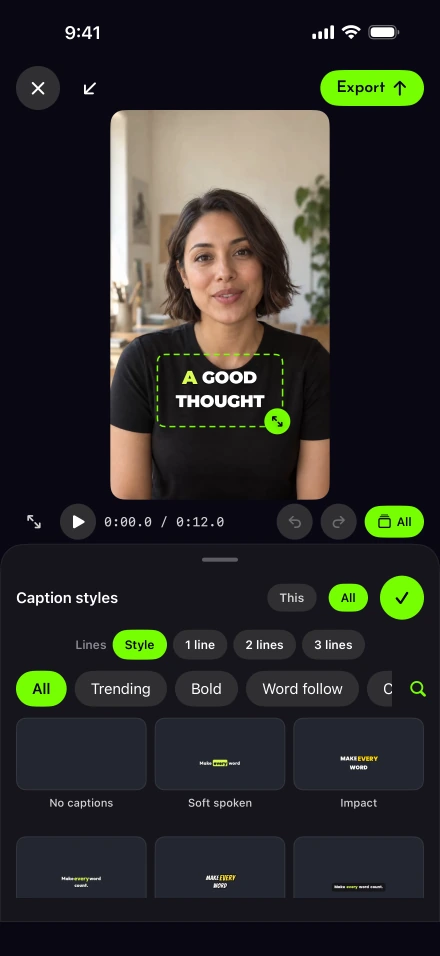
There are 111 caption styles and 15 bundled typefaces, and every style can be changed. Customise adjusts size, weight, background, outline, shadow, capitals and alignment. You can show one to eight words per caption across one to three lines, with position presets for the upper, middle and lower portions of the frame.
A busy screen recording may need a different treatment from a plain talking-head shot. DCMP advises keeping captions clear of faces and essential graphics and generally prefers no more than two lines. That is a useful review principle even when a style permits three: keep the explanation readable without hiding the thing being explained.
Current-word effects include color, reveal, pill, typewriter, lines and underline, while word pop can be off, soft or spring. Preview the whole sentence before choosing an effect. The editor also supports placing captions behind the presenter, which works best with one well-lit person and still needs a readability check.
Save a treatment for the next recording
Save as style keeps your choices under Mine. Select that saved style in Auto edit settings when you want later videos to begin with the same treatment. Review each new recording anyway: the face, clothing and background may have changed even when your typography has not.
For a short introduction, prioritize the person’s name and the sentence introducing their work. In a demo video, leave controls and interface labels uncovered. After exporting another aspect ratio, check again because the available space around the speaker is different.
Can you translate the captions?
Yes, from English captions into the languages your iPhone’s translation supports; the voice stays as recorded. Translate starts from English captions and uses Apple’s Translation framework for supported destination languages. The phrase start and end times stay in place; translation shows complete phrases without word-by-word effects. Restore English captions brings back the English version.
The recorded voice does not change. This is text translation, not dubbing, and the translated wording still needs a competent language review before publication. Apple’s translation settings guidance explains language downloads for on-device translation; the choices offered by the app depend on support available on the phone.
Check more than the spelling
W3C’s caption guidance includes meaningful non-speech audio in the information captions should communicate. Speech transcription alone will not supply every sound cue or speaker distinction. W3C’s prerecorded-caption criterion is a useful reference for accessibility requirements, not a certification that selecting a caption style meets them.
Educators and lesson creators should also allow time to read unfamiliar terms. DCMP’s educational reading-rate guidance varies with the audience’s level. If a long phrase vanishes before it can be read, reconsider the spoken pace as well as the font size; the delivery pace guide helps with that earlier decision.
Before posting the finished video, watch once with sound and once without it. The first pass checks agreement with the voice; the second asks whether the words make sense when they carry the explanation themselves.