
Good thoughts, in your own voice.
About Lightshot.
A place for your words to become a video.
Lightshot is a voice-following teleprompter and video studio for iPhone. Prepare a script, speak at the lens and finish the take in one app. It is built for people sharing a lesson, explaining their work or putting an idea into words.
Coming to the App Store. Requires iOS 26.5 or later and a paid plan.
The product
Your words.
Your pace. Your take.
These are screens from the iPhone app. Open a capture to look closer, or watch a real recording before and after editing.
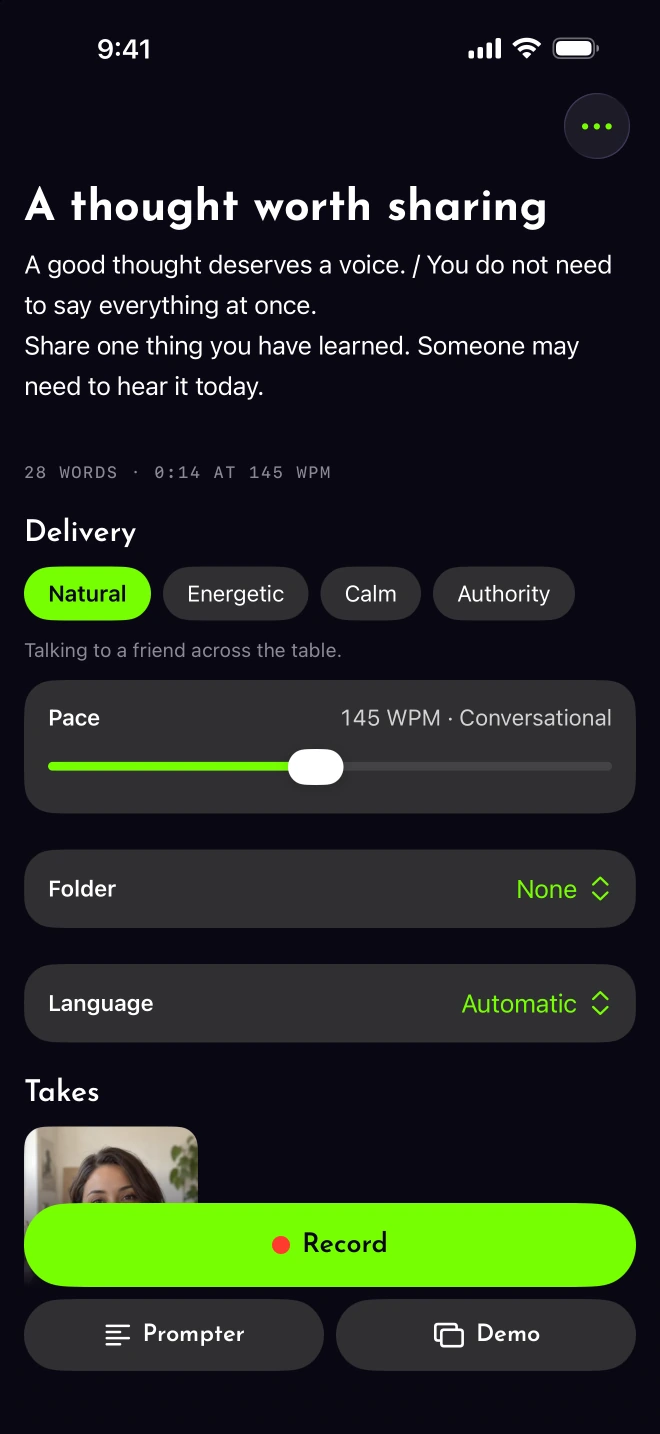
Words you would say.
Write, paste or import a script. Adjust the delivery marks before recording.
Full-size script screen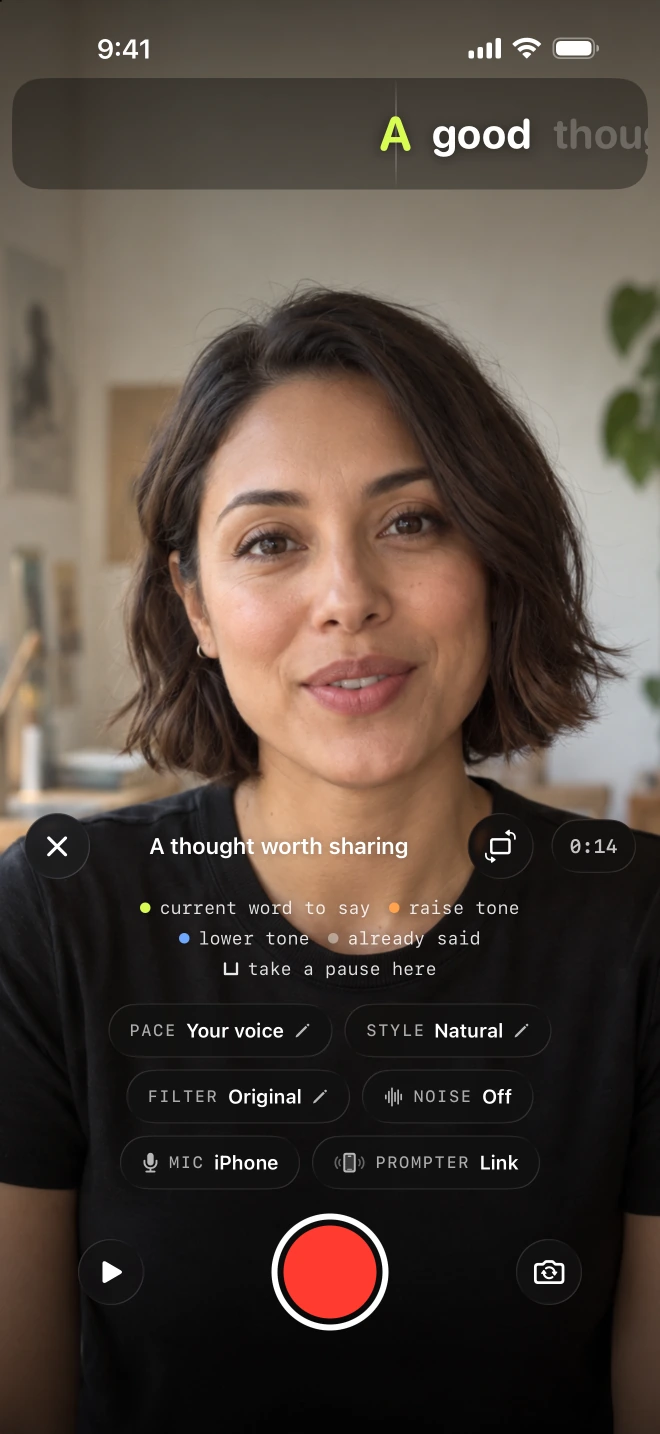
Room to find your rhythm.
Let the script follow your voice. Redo a sentence when a line goes wrong.
Full-size recorder screen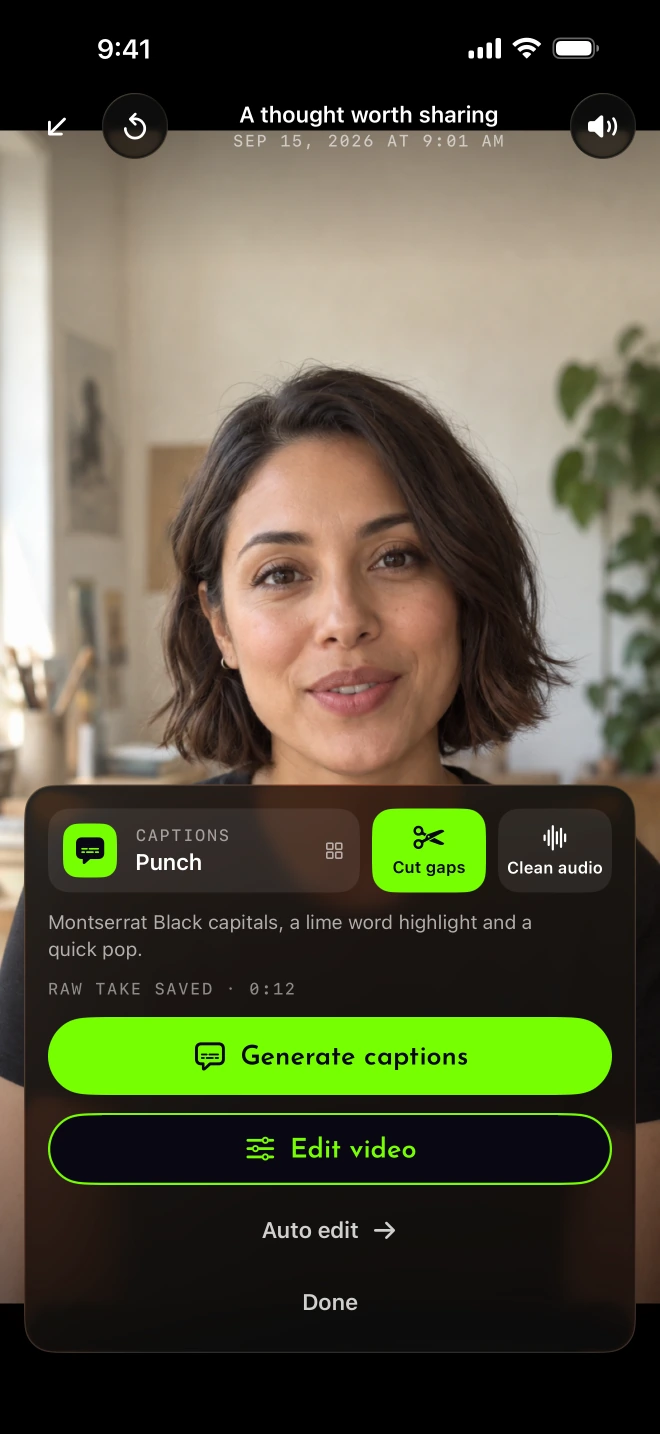
A take you can shape.
Cut quiet gaps, clean the audio and add captions. Review the result before sharing.
Full-size review screen
The person behind it
Built by
Samuel Godfrey.
Samuel Godfrey is the founder of Luminous Digital Visions, a software and AI studio that builds custom applications, websites and automated workflows for businesses.
Samuel built Lightshot to bring script preparation, recording and video editing together on an iPhone. The starting point was a familiar frustration: a prompter moving at a fixed speed, with the speaker trying to keep up.
Voice-following gives the delivery room to breathe. Sentence retakes make a small mistake easier to recover from. Editing belongs with the recording, so finishing a thought does not mean starting over in another app.
Why it exists
Good thoughts are
worth passing on.
A useful thought deserves a clear way to reach someone. Lightshot brings the script, the recording and the edit together so you can share what you know in your own voice.
A useful lesson, an explanation or a skill is enough. You do not need a performance persona to have something worth sharing.
What you can make
Give the idea
a clear delivery.
Start with the kind of video you need to record. These are practical workflows to try with your own words.
Make the next step easy to follow.
Prepare a lesson or coaching introduction with one idea per passage.
For coaches Explain your workSay what you are building, clearly.
Shape a founder update or launch video around the point you want to make.
For founders Help a customerPut a face to the explanation.
Record a service introduction, product walkthrough or useful answer.
For small businessesBefore you begin
The practical
details.
Scripts, takes and edits stay on your iPhone. Voice-following and captions use Apple’s on-device speech recognition. Posting or scheduling a finished video uploads it to Lightshot’s server.
Language support and camera options depend on your iPhone. Read the privacy policy and supported-iPhone guide for the details.
- Product
- Lightshot, a voice-following teleprompter and video studio
- Creator
- Samuel Godfrey, founder of Luminous Digital Visions
- Platform
- iPhone. iOS 26.5 or later. No Android, iPad or web editor.
- Availability
- Coming to the App Store. Check availability.
- Account
- Create a Lightshot account before confirming your subscription payment with Apple.
- Plans
- $3.99 weekly, $9.99 monthly or $59.99 yearly (USD). Every feature in every plan. No free plan or trial. See pricing.
- Operator
- Luminous Digital Visions, LLC. Terms of service.
- Contact
- Product questions, corrections and press inquiries. For product facts and images, see the press kit.
QUESTIONS
A few things
to know.
Who built Lightshot?
Lightshot was built by Samuel Godfrey, founder of Luminous Digital Visions. The app is operated by Luminous Digital Visions, LLC.
Does Lightshot write the script for me?
You can write, paste, import or start from a template. On supported iPhones, Draft it for me can smooth your completed template answers with Apple Intelligence. You review the draft before recording.
What do I need to use it?
An iPhone running iOS 26.5 or later, a Lightshot account, and a paid subscription. There is no Android, iPad or web editor, free plan or trial.
Does my video leave my phone?
Scripts, takes and edits stay on your iPhone. Posting or scheduling a finished video uploads it to Lightshot’s server. The privacy policy explains that workflow.
See the take for yourself
From the recording
to the finished video.
Compare one original recording with its edited version, with sound and captions.