
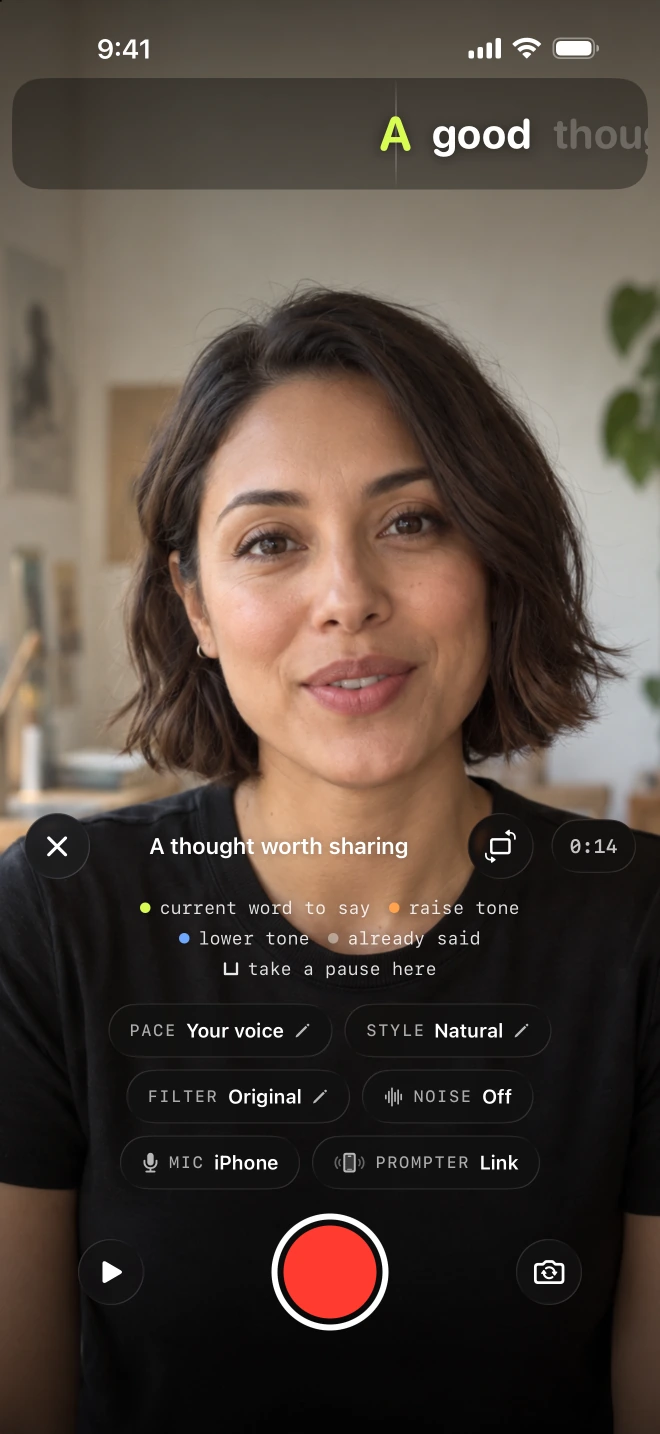
You have said the opening clearly and reached the useful explanation. Then a word comes out wrong. Keeping that opening is the reason for Lightshot’s retake controls: repair the latest passage while the rest of the take remains available. They sit inside the recorder, alongside the rest of the video workflow.
How do you redo one sentence without starting over?
Pause the take, choose Redo the last sentence, then record the sentence again from its first word. Tapping the record button pauses: the clock stops and the script holds its place. Then decide whether the problem belongs to a single sentence or to the whole passage since your previous pause. These are separate controls because they remove different amounts of footage.
| Control | Result |
|---|---|
| Redo the last sentence | Cuts to that sentence’s start and puts its words back in front of you. |
| Delete everything since the last pause | Removes the latest recorded part and returns to its beginning. |
| Finish recording | Joins the kept parts and opens the take in review. |
A sentence boundary comes after a period, question mark, exclamation point, ellipsis or line break in the prepared text. The cut lands 0.2 seconds before the moment the sentence first appeared on screen. If the sentence began in an earlier part, redo drops the entire latest part instead. Our step-by-step mistake repair guide walks through that edge case, and with voice-following on, the prompter picks up again from the sentence’s first word.
How do other apps handle retakes?
Several apps let you replace part of a take instead of the whole video. They differ in what you replace and in whether the script has to be split into sections before you start.
| App | What you replace | How the app describes it |
|---|---|---|
| Cue: Teleprompter | A section of the script | “Split your script into sections and shoot each one as many times as you want”; the best take of each section is merged, so “you redo that line, not the whole thing” |
| HighlightMe | A segment | “Pause, resume and undo a segment as often as you like, and it all becomes one take” |
| Captions | A segment | “Reshoot specific segments” |
| Teleprompter.com | Nothing is removed | Pause, then resume “into the same recording”; redoing a part isn’t described on the pages checked |
| Lightshot | The sentence being read, or everything since the last pause | Redo cuts back to just before the sentence first showed and rewinds the script there, with no sections set up beforehand; delete removes the last part |
Sources: the US App Store listings for Cue: Teleprompter and HighlightMe, Captions’ teleprompter page and Teleprompter.com’s app listing and pages, all checked October 8, 2026. The names are there to say which app is which. None of the sources checked that day describes a cut back to the start of the sentence with the script rewound there, without splitting the script first. Each app can change what it offers, so look at its current listing before deciding.
Resume the thought in the same position
Before recording again, read the lit word and remember what came immediately before it. Return your hands and gaze to a comfortable position, take a breath, then resume. The goal is a join you are happy to hear and see, not a rush back into speech.
Northwestern’s preparation guidance recommends practicing aloud, and Northern Illinois University’s recording tips suggest supporting the phone at eye level. Those basics are useful here: a stable phone leaves fewer visible differences between the kept line and its replacement. For an awkward transition, leave the take intact and adjust it later in the video editor.
Writing shorter spoken units in the script editor gives you deliberate restart points. You can also map redo to a remote or pedal so the correction does not require reaching toward the phone. A remote redo command pauses a rolling take before making its cut.
What should you check after a redo?
The joins, before any other edit. When the thought is complete, tap Finish recording, then listen across every repaired passage for a missing opening sound, a repeated word or a gesture that changes abruptly. The auto edit can remove quiet gaps, but it cannot decide whether a repaired sentence still says what you meant.
Generate and inspect captions for the finished audio, especially around the edit. Apple’s on-device speech transcription provides the recognition used by Lightshot, while your listening check catches names and wording that need correction. DCMP’s caption presentation guidance is useful when a caption near the join covers a face or becomes difficult to read.
Can you compare two takes of the same script?
Yes: record a second take, then compare the two side by side and keep the one you prefer. A redo is for a local repair. If you want a different tone for the entire message, finish this version and record another. From the script, Tap two to compare opens Compare takes; Keep this one lets you choose between them. The batch recording guide uses that separation between small repairs and whole new performances.
Save enough space for the session. Apple explains where to check iPhone storage, and Lightshot keeps recorded parts if joining them fails so you can try again. Its take recovery design also covers interrupted sessions, but physical-device recovery cases remain untested; it is not a guarantee against loss. Closing a paused recorder asks before discarding the parts, so read that message before leaving.