
A good thought. A finished video.
A teleprompter app with captions
and a video editor for iPhone.
Lightshot is a teleprompter app for iPhone that also finishes the video. It follows your voice through a script you wrote and lets you redo a sentence mid-take. Then one tap cuts the silences and adds captions, the editor shapes the take, and you export it or post it to the networks you connect.
Requires iOS 26.5 or later. Every feature is included on every paid plan.
From the words to the take
Give the thought
some room.
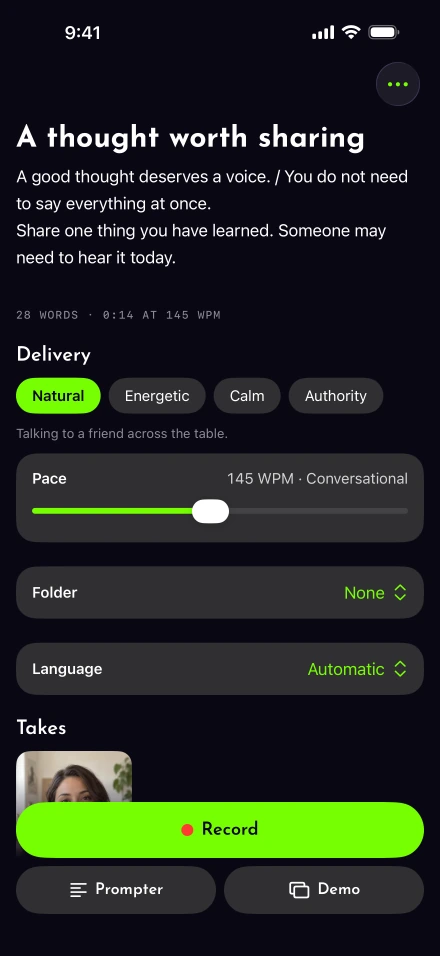
Shape your script, then keep the words close to the lens. Leave room for a pause, a breath or another go at a sentence.
The complete toolkit
Follow the order of a recording, or go straight to the tool you need.
Before you record
-
Scripts
Paste or import a script from a text, PDF or Word file, start from a template, and see where to lift, land and breathe.
While you record
-
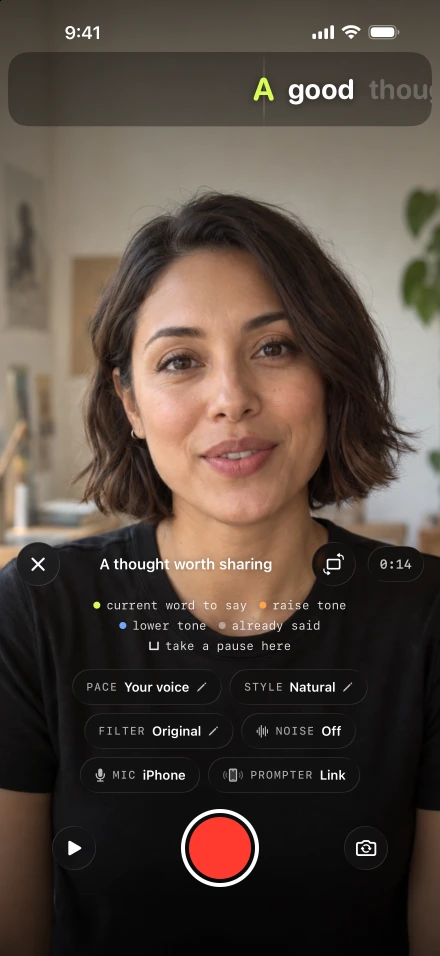
Voice-follow
Keeps moving at the pace it learns from you, waits when you stop, holds its place while you ad-lib, and has limits worth knowing.
-
Retakes
Pause mid-take, redo the sentence you fluffed or delete the last part, and the script rewinds to the right word.
-
Recording
Record with the script in one line under the front camera, in 1080p or 4K at 24, 30 or 60 fps where your iPhone supports it.
-
Two-iPhone prompter
Pair a second iPhone as the prompter: the camera phone drives it, it reconnects by itself, and the text can be mirrored for a glass rig.
-
Remotes and pedals
Control the nearby iPhone recorder from your Apple Watch, or assign Bluetooth remote and pedal buttons to record, redo and move the script.
-
Demo videos
Talk over a screen recording you already made, with your camera as a bubble, a split screen or a cutout.
After you record
-
Auto edit
One tap after a take cuts the silences and adds captions on your iPhone, with filler-word removal as an opt-in beta.
-
Captions
Captions from what your iPhone heard, with the script fixing spelling only where it agrees, in 111 styles with one to three lines and translation from English.
-
Video editor
Trim and reorder pieces, cut a line by deleting its words, and add text, music, a voice-over, a look or a new background.
-
Export
Export one edit in the shapes each network prefers, framed around your face, up to 4K or 8K where your iPhone supports it.
-
Post and schedule
Post now or schedule up to 30 days ahead to the networks you connect in Settings, with length, size and caption checks before anything uploads.
What runs on the iPhone, and what needs a connection?
Everything from the script to the exported file runs on the iPhone. Posting is the step that needs a connection, because the finished video goes to Lightshot’s server, which hands it to each network.
| Step | What happens | Where it runs | Needs a connection? |
|---|---|---|---|
| Record | The script follows your voice; pause, redo the last sentence or delete the last part, then finish | iPhone, with Apple’s on-device speech recognition | No, apart from a one-time speech download the first time a language is used |
| Auto edit | One tap cuts silences, with optional filler removal (English, beta), zoom at cuts and your brand kit | iPhone | No |
| Captions | Words from what the iPhone heard, with the script fixing spelling where it agrees; 111 styles | iPhone | No, apart from that one-time language download |
| Export | Original, 1080p, 4K or 8K where the iPhone can encode it, plus extra shapes framed on your face | iPhone | No |
| Post or schedule | Upload once, then post now or 10 minutes to 30 days ahead | Lightshot’s server, then each network | Yes. The networks you can connect are listed in Settings, Connected accounts; each depends on the platform approving Lightshot, and TikTok and YouTube posts stay private until their reviews pass |
Signing in and checking the subscription also go through Lightshot’s server. A posted video is deleted from the server once every network has finished with it, or 48 hours after the latest scheduled time at the most. A second iPhone used as the prompter talks to the camera phone directly, not through the server.
Voice-following isn’t unique to Lightshot: Teleprompter.com, PromptSmart, Norton Five, VoicePrompter, Speakflow, Cue and HighlightMe follow the speaker’s voice too, and Captions matches its scroll to your pace (each checked October 8, 2026). Each feature page explains what Lightshot does around it, and where it stops.
The progress screen tells you when you can leave an export running in the background. Some effects need the app open. Settings › Notifications lets you hear when a video is ready, an export is interrupted or a post goes out. Check the post’s result when a network has not confirmed publication.
Some limits come from the phone itself. 4K and 60 fps recording depend on the front camera, and the languages voice-following understands depend on the iPhone and its iOS version.
What Lightshot doesn’t do
The recording and editing studio runs on iPhone, with an optional Apple Watch companion remote. There is no iPad, Android or web studio. It doesn’t make AI avatars, clone or dub your voice, or redraw your eyes to fake eye contact, because the script already sits under the lens. The editor works on one take at a time, and filler-word removal is an English-only beta that stays off until you turn it on.
QUESTIONS
Questions about the features
Which Lightshot features need Apple Intelligence?
Two: Mark with Apple Intelligence, which re-marks where a script lifts, lands and breathes, and Draft it for me, which smooths the lines you answered in a script template. Both need an iPhone with Apple Intelligence turned on. Voice-following, the auto edit and captions work without it.
Does the auto edit run by itself after every take?
No. The review screen offers Auto edit, and it runs only when you tap it. You can also cut the gaps, clean the audio or generate captions one at a time, or open the editor and cut the take yourself.
Can I use Lightshot only as a teleprompter?
Yes. Prompter, in the script editor, shows the script full screen without recording, which suits a second iPhone or a glass prompter rig. Rehearse without recording runs the prompter inside the recorder without filming.
Can I control recording from Apple Watch?
Yes. The companion remote needs watchOS 26.0 or later and the paired iPhone nearby with a script’s recorder open. Record or pause, redo a sentence while paused, finish the take, hold the script or step backward and forward. The watch shows the script title and progress; the iPhone does the recording.