
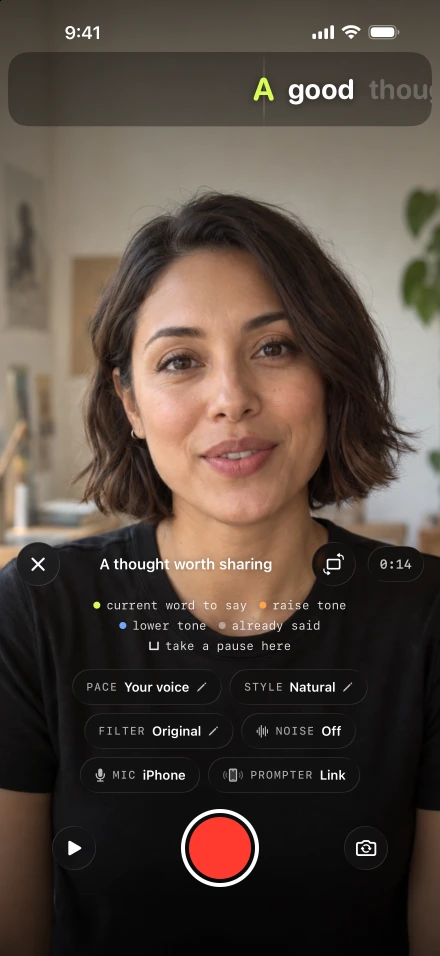
The difficult sentence is rarely the one you rehearsed at exactly the right speed. You might slow down for a name, leave a pause after a question or add a thought between paragraphs. Voice-following lets those choices lead the script. It is the reading mode within Lightshot’s recording and editing tools, built around words you have already prepared. It never writes the script from your speech.
How does a teleprompter with voice recognition work?
It listens through the microphone, turns what you say into words with speech recognition, and matches those words to the script so the text stays at your place. Lightshot uses Apple’s SpeechAnalyzer for this listening work, and Apple describes the transcription model as running on the device.
Recognition always trails the sound you have already made, so Lightshot doesn’t wait for each word to come back before moving. While you are speaking, the line keeps going at the rate it has learned from you. Every recognized script word then corrects its position. Up to 200 of the script’s own words are passed to the recognizer as hints, which makes names and jargon more likely to come back as you wrote them.
What happens when you pause, ad-lib or make a mistake?
The prompter waits at the next word you haven’t read yet, and each situation below has a fixed rule. The numbers come from the app’s code; none of them has been measured on a physical iPhone yet.
| When you… | What the prompter does |
|---|---|
| Pause to breathe or think | After 0.9 seconds of silence, the line settles on the next unread word and stays there. It moves again when you start speaking. |
| Ad-lib or go off script | After 3 seconds of speech with no script word recognized, it holds at the next unread word and shows Off script · waiting at the lit word. The next script word it hears carries on. After 3 unmatched words in a row, matching gets stricter, so an aside that shares the script’s topic words can’t walk the text forward. |
| Speed up or slow down | It follows the rate you are speaking at, and each recognized word corrects the line to your real place. |
| Redo a sentence | Pause the take and choose Redo the last sentence. The recording is cut back to that sentence’s start and the script rewinds there, so the first word of the sentence is lit when you carry on. |
| Read in a noisy room | Sound alone can’t read the script. The microphone level only bridges the gap between recognized words, and the line runs at most 3.5 words past the last one (2 words before the first). If it hears speech but no words for 4 seconds, it offers Retry voice or Use auto pace. |
| Switch to auto pace | Tap Use auto pace or turn off Follow my voice. The script then scrolls on a timer at 60 to 240 words a minute, in steps of 5. A mapped remote’s Faster and Slower buttons change it by 10. |
Pausing the words and pausing the camera are different choices. A breath can stay in the recording while the words wait. To take a spoken mistake out, use the sentence redo control. To stop the words on purpose while the camera keeps filming, use Hold on a mapped remote button.
Which other teleprompter apps follow your voice?
Many do. Word-by-word following is now common among iPhone teleprompters, so the useful question is how each one behaves when you stop, wander or repeat yourself. Apps move a script in four broad ways, and this table names the ones whose own descriptions match each type.
| Type | How the script moves | Apps that describe it |
|---|---|---|
| Timed scroll | At a speed you set, whether or not you are talking | CapCut’s teleprompter (manual speed); Teleprompter Pro (continuous, paging or timed); Lightshot’s auto pace |
| Pace matching | Speeds up or slows down to your pace without tracking words | Captions (“automatically adjusts the teleprompter speed to match your pace”) |
| Pause on silence | Moves while it hears sound and stops when you go quiet | Slate AI (“Auto-pause on silence”; it added voice tracking for English texts on October 2, 2026) |
| Word tracking | Matches recognized words to the script and waits when you stop or improvise | Teleprompter.com (VoiceGlide, 28 languages), PromptSmart (VoiceTrack; English only on Pro), VoicePrompter (“word by word”), EyePrompt (“Smart Follow”), Cue (“listens as you speak”), HighlightMe (“Smart Progression”), Teleprompter for Video (“voice-assisted scrolling”) and Lightshot (Follow my voice) |
Sources: each app’s US App Store listing, Teleprompter.com’s VoiceGlide page and Captions’ teleprompter page, checked October 8, 2026. App names identify the apps only; Lightshot isn’t affiliated with any of them. Vendors change features often, so check their current pages.
Lightshot’s version is one of the word-tracking apps above. This page sets out its rules so you can compare behavior, and the comparison with Teleprompter.com goes through the differences in more detail.
How do you start voice-following in Lightshot?
Follow my voice is on from the start, so there is nothing to switch on.
Open one of your saved scripts and tap Record.
Check that the Pace control reads Your voice.
Start the take and say the lit word, then carry on through the sentence at your own speed.
Stop whenever you need to. Start again from the lit word.
The WPM value still matters: it sets the starting rate before your own pace is learned, and it is the coaching target in the recorder. Baruch College’s speaking-rate guidance suggests a measured starting pace for clear speech, and your own read-aloud pace and pauses should decide the setting for the real script. Rehearse a paragraph with your longest sentence and any unfamiliar names. Northwestern’s webcam recording advice also recommends reading a script aloud first, and our guide to a conversational delivery applies that practice to the near-lens line.
Which languages does voice-following understand?
The languages your iPhone’s speech recognition supports, which vary by model and iOS version. The script’s Language menu decides which one the app listens for. Open Settings › Help and support to see Voice follow languages on this iPhone; the language help page explains why the list belongs to your device. The first use may need a download, because Apple manages speech model files separately from the app. Number spelling and contraction matching use English rules.
Keep a manual way forward
If the words stop moving, check the microphone first, then retry or switch to auto pace. Inspect the Mic control and follow the microphone checks before changing your delivery. A separate prompter iPhone listens through its own microphone, so test from where you will actually stand, using a few lines of the real script.
Accents, external microphones and tracking lag haven’t been measured in physical-device tests yet. Treat your first rehearsal as a check rather than assuming perfect following. Captions come later: they are generated from the recorded speech after the take. Voice-following is included in every subscription plan.