
A camera mounted at the right distance may put its small script out of comfortable reading range. A second iPhone gives the words their own position: close to the lens, inside a glass prompter, or wherever your setup needs the display. This arrangement extends the recording tools without requiring the reading screen to be the camera.
Can you use two iPhones as a teleprompter?
Yes: one iPhone films and the other shows the script, controlled from the camera phone. Keep the filming iPhone in the recorder. On the reading iPhone, open a script and choose Prompter or Prompter only. That screen shows the words without filming. The camera phone can then drive its place and controls after the connection is accepted.
Both devices are iPhones running a supported iOS version; review the device requirements before building a mount around an older phone. This is a nearby-device connection, based on Apple’s Multipeer Connectivity technology, rather than a remote browser session or an internet link.
How do you pair the two iPhones?
Choose the reading phone from the camera phone, then confirm the same code on both screens. Tap the Prompter pill on the camera phone and choose the reading iPhone from the nearby prompter phones it lists. The first time two phones pair, both show the same 6-digit Pairing code. The prompter phone asks Let [phone] control this prompter?: tap Allow only if the camera phone shows the same code. Then tap Pair on the camera phone. The link starts once both phones have confirmed.
The same two phones link without a code after that. To end the pairing, open the Prompter pill on the camera phone and tap Unlink: both phones forget each other, and the next link shows a code again. A prompter already driven by one camera refuses a second camera connection.
Allow local-network access when iOS asks. Apple explains the local-network permission used by apps that discover nearby devices. Lightshot requires encryption for the link. If discovery or control does not work, the pairing help page covers the checks, and the two-phone walkthrough puts them in setup order.
The connection is designed to retry after a drop and to resynchronize the script position during recording. Reconnection behavior has not yet been measured on physical devices. Rehearse a connect-and-read sequence before depending on the arrangement for a long explanation.
Let the prompter phone hear you
For voice-following, the reading phone uses its own microphone. The camera phone’s recording microphone and the prompter phone’s listening microphone have different jobs. A clear camera recording does not prove that the second phone can recognize the words from behind the glass.
Speak at the distance you will use and watch whether the lit word follows. Apple documents per-app microphone input selection; Lightshot’s microphone checks help you identify which input is active. If you choose to pair an accessory, follow Apple’s Bluetooth pairing steps and test it with the actual arrangement. No microphone or prompter rig is certified here as tested.
How do you mirror the words for a glass teleprompter?
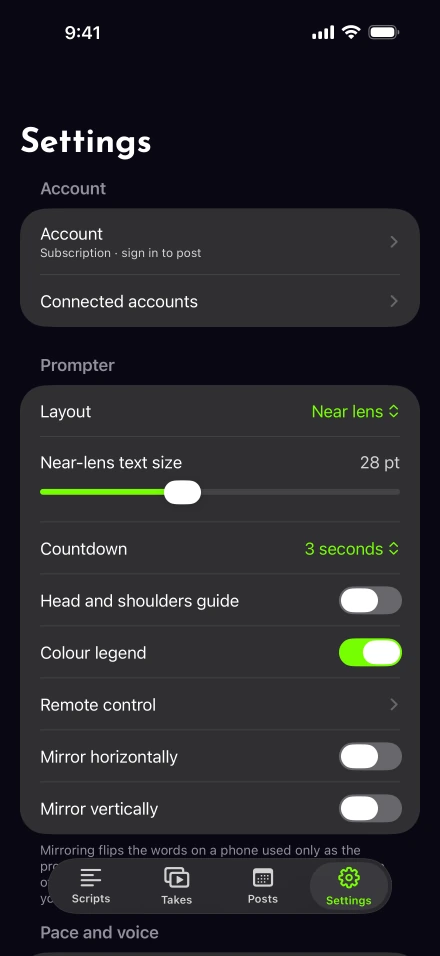
Flip the words on the prompter phone with one of its two mirror switches, chosen by which way its screen faces. Glass reflects the screen once, so the words have to be flipped to read the right way round. On the reading iPhone, use the two switches in Settings › Prompter, also in the prompter-only screen’s Prompter sheet. Turn on Mirror horizontally when the top of the screen faces away from you, or Mirror vertically when it faces you. Both together turn the words upside down, for a phone mounted that way. The switches change only the prompter-only display. They don’t reverse a saved video or turn the camera preview into a glass-rig view.
Read an asymmetric word through the glass before beginning; it should appear the right way around from your speaking position. Then set a text size that you can read without leaning forward. Northwestern’s eye-level camera guidance is a useful starting point for camera placement, while the eyeline setup guide helps judge the result on video.
Check controls without moving the mount
Once the phones are positioned, practice starting, pausing and returning to the script. If touching either phone would move the frame, remote and foot-pedal mappings provide another control path. Test the exact button before filming a full take.
The pairing link carries script information and controls directly between the phones; it is separate from the upload used for publishing. See the privacy policy for that distinction. Mirroring is included with the rest of the app, so the practical decision is whether the extra display improves your own reading position enough to justify the setup.