
Make the first test small: your opening and two sentences are enough to reveal a dark face, an echo or the wrong microphone. Fix those before recording a five-minute explanation. This procedure uses Lightshot’s recorder and applies the same basic setup decisions you would make with another camera app.
Prepare the phone and the message
Check battery and free space, then clean the camera lens. Apple’s iPhone Storage page shows where to check capacity. The app’s storage help explains how takes and editing files use it. Keep space for the recording and its finished export.
Choose one purpose for the video and prepare a short script. Use the one-minute writing sequence for a first attempt. In Lightshot you need camera and microphone access; speech recognition is also needed for voice-following and captions. Confirm the supported iPhone and iOS version before the session.
Should you film vertical or horizontal?
Vertical for Reels, TikTok and Shorts; horizontal for a standard YouTube video or a lesson. Mount the phone securely at roughly eye level. Pick portrait for a vertical composition or landscape for a horizontal one, then choose the recorder’s orientation before starting. Leave a little room above your head and enough space for the captions you intend to add. Avoid relying on a later crop to recover a hand or object that was never in frame.
Northern Illinois University’s recording advice supports stable mounting and even lighting. Its course-format preference for horizontal video is specific to that use; choose your own orientation for the audience and destination.
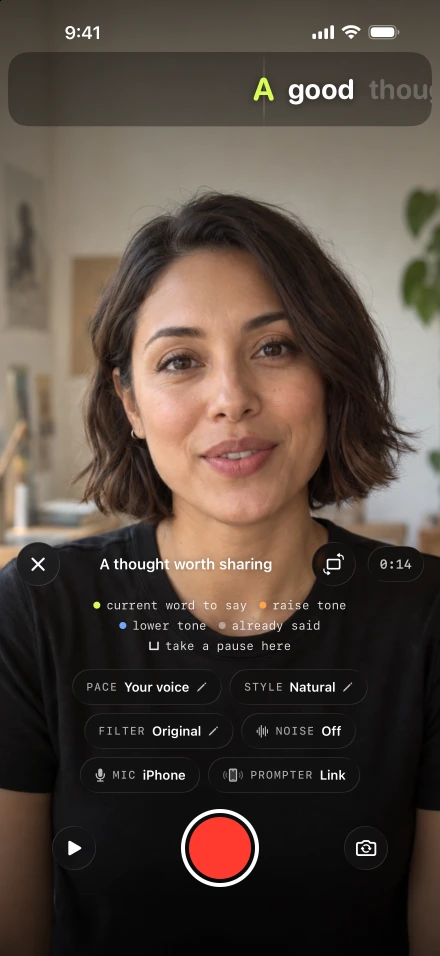
Set the prompter close to the actual lens with the eyeline setup steps. Do a quick silent playback to see whether reading pulls your gaze downward. Enlarge or move the text before trying to fix the effect with your face.
Where should the light be when you film yourself?
Facing you, with nothing bright behind you. Face a window or place a light in front of you, then inspect your face in the preview. Move slightly if one side falls into deep shadow or the brightness makes you squint.
Northwestern’s webcam checklist recommends front lighting and a camera near eye level. For a longer session, watch whether moving sun changes the shot between takes. Record related clips under similar conditions when matching them matters.
How do you check the sound before recording?
By listening to a short test recording rather than trusting the microphone indicator. Choose the input from the recorder’s Mic pill. Speak from the final position at normal volume, then listen to the sample through headphones. A microphone being connected is not proof that it is selected or that its placement sounds good.
Apple describes per-app recording input controls; our microphone guide explains the Lightshot flow. Moving closer to a microphone or choosing a quieter room can matter more than an audio-cleanup setting. Connecting or removing an input during a take pauses recording.
Choose settings and make the take
Start with 1080p at 30 fps if you do not need a larger file. Lightshot also has 4K and other frame rates where the camera supports them.
Use Rehearse without recording for one pass through the opening.
Record with Follow my voice if recognition is available, or select a comfortable timed pace.
Pause between complete thoughts when needed. Use sentence recovery for a fluffed line, then finish the take.
4K capture uses HEVC where available and takes more storage. Apple explains HEVC compatibility and transfer behavior. Higher resolution cannot repair missed focus, poor lighting or distorted sound.
Watch the exported file
Review the recording, choose any one-tap editing you need and proofread its caption text. A generated transcription can mishear a name even when the spoken take is good.
Follow the save and share procedure, then play the resulting file from start to finish. Verify that the opening is audible, the last word remains intact and the crop includes your intended gestures. Keep that finished file before clearing old recordings.