
You have a usable opening and an example you like, then say the wrong name. Stop there. Lightshot’s retake controls let you replace a smaller section while keeping earlier parts of the same recording. The right choice depends on where the mistake began.
Should you redo the sentence or delete the last part?
Redo when only the current sentence is wrong; delete when everything since your last pause should go.
| Situation | Action | What changes |
|---|---|---|
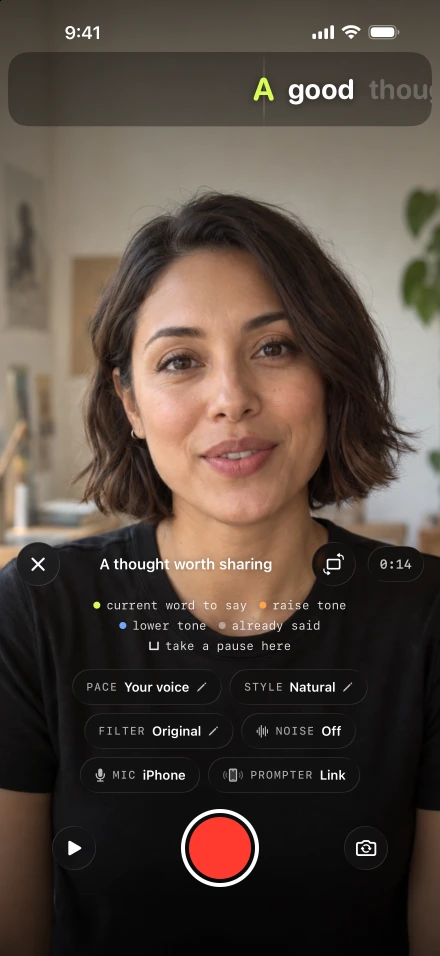
| You need a breath | Pause | Recording stops and the script holds; continuing creates another part. |
| The current sentence went wrong | Redo the last sentence | The take cuts back and the script returns to that sentence. |
| The whole recent section needs replacing | Delete everything since the last pause | The last part is removed and the script returns to its beginning. |
This differs from removing quiet gaps after recording: a retake replaces the spoken content. Silence removal cannot correct a wrong number or a sentence you no longer mean.
How do you redo one sentence mid-take?
Pause, choose the redo control, and say the whole sentence again from its first word.
Tap the record button to pause as soon as you notice the error.
Tap Redo the last sentence. Check which sentence is now visible before speaking.
Return to roughly the same posture and volume. Start the sentence again from its beginning, including the words you said correctly before the mistake.
Continue with the next idea, then use Finish recording when the take is complete.
Repeating the redo action goes back another sentence. Sentence boundaries come from punctuation and line breaks in your script. The script preparation tools therefore help with repair as well as reading: use real sentence endings rather than one long block of text.
A sentence can cross a pause between parts. In that case, redo drops the most recent part rather than cutting inside the earlier one. Inspect the returned script position. For deliberate section boundaries, pause between complete thoughts.
How do you check that a redo joined cleanly?
Play from a few words before the cut through the replacement. Listen for a missing syllable, a sudden volume change or a breath cut in half. Watch your hands and head position. A visible jump may be acceptable in a short talking video, but the sentence must remain intelligible.
Northwestern’s recording advice recommends practicing the script aloud; rehearse a troublesome transition before its next attempt. Baruch College’s pace exercise can help if the mistake keeps happening because you are rushing. Use our reading-speed calculations to remove excess words instead of squeezing them in.
If two full takes are close, open the script’s takes and use take comparison to choose between them. The video editor works on one take at a time; do not plan on assembling a new performance from several complete takes there.
Distinguish a mistake from an interruption
Connecting or removing a microphone pauses a recording. Before the replacement line, check the selected input; Apple explains how recording inputs are selected. A changed microphone can make two adjacent parts sound very different.
A call or app interruption also pauses the take. Follow take recovery help if the app closed. Recovery is designed into the recorder, but physical-device interruption tests have not been completed, so keep important originals. A nearly full phone deserves attention before a long session: use Apple’s iPhone Storage instructions and the app’s storage controls.
Proofread what the viewer will receive
Generate captions from the finished speech and check the replacement sentence carefully. W3C’s caption overview distinguishes speech text from other meaningful audio; a corrected spoken line still needs correct visible wording. Save and replay the exported file using the export and sharing steps, especially around the repaired join.