
Written by Lightshot’s maker
Competitor facts were checked on October 8, 2026, on each vendor’s own pages and its US App Store listing; Lightshot’s side comes from the app. This compares documentation, not measured accuracy or speed. “Not found” means we didn’t find it in their documentation, which is weaker than “no”. Prices and plans change.
This page is about VoicePrompter: Teleprompter by Kanstantsin Suvorau, first released in February 2026. An app called VoicePrompter AI Teleprompter, from Laan Labs, is unrelated.
VoicePrompter and Lightshot side by side
| Question | Lightshot | VoicePrompter |
|---|---|---|
| US App Store rating (count) | No ratings yet | 4.60 (52) |
| Price (USD) | Lightshot Weekly $3.99, Lightshot Monthly $9.99, Lightshot Yearly $59.99; every feature on every plan | Monthly $9.99, Yearly $49.99, Lifetime $99.99 (a Lifetime Promo at $69.99 was listed) |
| Free plan or trial | No | Yes: 3 scripts free, no account |
| Account | Required before you subscribe (Sign in with Apple) | Not required |
| Devices | iPhone, iOS 26.5 or later, plus an Apple Watch remote | iPhone, iPad, Mac, Android and the web |
| Follows your voice | Yes: corrects its place on each recognized script word, on the iPhone | Yes: “word by word”, against the whole script, on the device |
| Languages | Depend on the iPhone; the script’s language is detected or chosen | “60+ Languages, Auto-Detected” |
| Off script | Holds at the next unread word after three seconds without a script word | “Go off-script and it patiently waits for you” |
| Jump to a sentence | Back or forward a sentence from a remote, a pedal or the Apple Watch | Say “Next sentence” or “Previous sentence”, or tap any word |
| Script over other apps | No | Yes: floats over Instagram, TikTok and other apps |
| Redo a sentence mid-take | Yes: trims back to the sentence’s start and rewinds the script | Not found in their documentation (checked Oct 8, 2026) |
| Recording | 1080p or 4K at 24, 30 or 60 fps where the front camera supports it | Up to 4K, a choice of lens, 10-bit HDR |
| Captions | Yes, on the iPhone, 111 styles | Not found in their documentation (checked Oct 8, 2026) |
| Silence cuts and editing | One-tap silence cuts, then an editor for the take | Not found in their documentation (checked Oct 8, 2026) |
| Posting | Post or schedule to the networks you connect; X through Share | Not found in their documentation (checked Oct 8, 2026) |
VoicePrompter column: its US App Store listing (rating and count from Apple’s lookup service), its iOS page and its llms.txt file, read October 8, 2026.
Lightshot’s column comes from the app. The networks you can connect are listed in Settings, Connected accounts; each network has to approve Lightshot first, and TikTok and YouTube posts stay private until those reviews pass. Lightshot has no App Store ratings yet.
Do both prompters track words the same way?
Both listen for words rather than sound. VoicePrompter’s listing says it follows “your voice word by word” using on-device recognition and waits when you go off script; its site says it tracks speech against the whole script. It also has a sound-triggered mode and a constant-speed mode.
Lightshot’s voice-follow keeps moving at the pace it has learned from you between recognized words, rather than waiting for each one to be confirmed, and corrects itself each time a written word comes back from the recognizer. After three seconds of talking with no script word it holds at the next unread word and shows “Off script · waiting at the lit word”. Nobody has timed or scored the two side by side for this page.
The difference you’ll feel is how you jump. VoicePrompter takes spoken commands and a tap on any word. Lightshot steps a sentence back or forward from a Bluetooth remote, a foot pedal or the Apple Watch, not by voice.
Which languages and devices?
VoicePrompter states “60+ Languages, Auto-Detected” and runs on iPhone, iPad, Mac, Android and the web. Lightshot runs on iPhone only. It detects the language of what you wrote once there are 12 or more words, or you choose it, and the languages available depend on the iPhone; language help shows how to see yours. This site gives no number for them.
What happens after the take?
VoicePrompter is a recording prompter: up to 4K, a choice of lens and 10-bit HDR, and on version 4.0 you can pause the scrolling without stopping the recording. We didn’t find captions, an automatic edit or posting in its documentation.
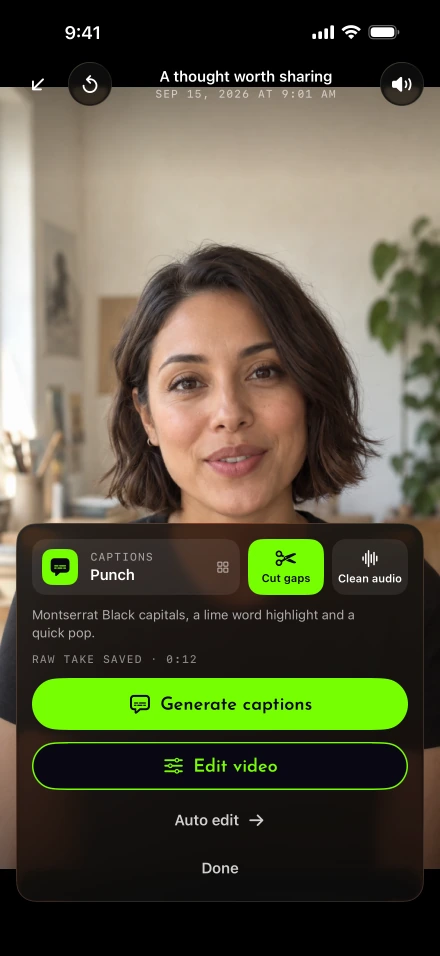
Lightshot carries on once you stop filming. If you fluffed a line, Redo the last sentence has already cut it back. Tap Auto edit to cut silences and time captions to your voice on the iPhone, then adjust the take in the editor.
Where VoicePrompter may fit better
It asks less of you up front: no account, three scripts free, and a Lifetime purchase if you’d rather not subscribe. Lightshot needs an account and a subscription before you can use it.
It goes where Lightshot doesn’t. Its prompter can float over Instagram, TikTok or another app’s camera, it runs on Android, Mac and the web, and on a Mac the prompter is hidden from a screen share. If you read in many languages, its stated 60-plus with auto-detection is more tha Lightshot publishes.
Where Lightshot may fit better
If the prompter is only the start of your job, Lightshot keeps the rest on the same phone: sentence redo, silence cuts, captions, noise removal, an editor, demo takes over a screen recording and posting to the networks you connect. A second iPhone can prompt while the first one films, and lift, land and breathe marks show how to say each line.
There’s no Lifetime option for Lightshot, only the weekly, monthly and yearly plans in the table. Weigh that against VoicePrompter plus whatever editor you’d use after it.