
Written by Lightshot’s maker
Competitor facts were checked on October 8, 2026, on each vendor’s own pages and its US App Store listing; Lightshot’s side comes from the app. This compares documentation, not measured accuracy or speed. “Not found” means we didn’t find it in their documentation, which is weaker than “no”. Prices and plans change.
Teleprompter.com and Lightshot side by side
| Question | Lightshot | Teleprompter.com |
|---|---|---|
| US App Store rating (count) | No ratings yet | 4.76 (29,278) |
| Price (USD) | Lightshot Weekly $3.99, Lightshot Monthly $9.99, Lightshot Yearly $59.99; every feature on every plan | App Store: Pro Weekly $4.99; Pro $9.99 and $19.99; Pro Annual $59.99 and $89.99. Web: Pro $19.99 a month, or $7.50 a month billed yearly; Max $49.99, or $24.99 billed yearly; Team $49.99 a seat, or $24.99 billed yearly |
| Free plan or trial | No | Yes: free Starter plan with a watermark and up to 1080p; 7-day trial on annual plans; 30-day money-back guarantee on the web |
| Devices | iPhone, iOS 26.5 or later, plus an Apple Watch remote | iOS, iPadOS, macOS, Android and the web, plus an Apple Watch remote |
| Follows your voice | Yes, on the iPhone; languages depend on the iPhone | Yes: VoiceGlide, on the device, “28 languages”, free on every plan |
| Script by the lens | Yes: one line under the front camera, or a movable panel | Yes: “right beside the lens”; on iPhone Duo, the outer display beside the rear camera |
| Redo a sentence mid-take | Yes: trims back to the sentence’s start and rewinds the script | Not found in their documentation (checked Oct 8, 2026) |
| Pause and resume | Yes, inside one take | Yes, “into the same recording” |
| Second screen | A second iPhone shows the script | Remote preview on another device (Pro); Director Mode on iPhone Duo, free on every plan |
| Remotes | Bluetooth page turners, pedals and keyboards, volume and shutter buttons, Apple Watch | Apple Watch, keyboards, presentation remotes, game and MIDI controllers, foot pedals |
| Mirrored text for glass rigs | Yes, on a prompter-only iPhone, every plan | Yes (Pro) |
| Captions | Yes, on the iPhone, 111 styles | Yes: “Automatic Subtitles” on Pro; one try on Starter |
| Silence cuts after recording | Yes, one tap, on the iPhone | Not found in their documentation (checked Oct 8, 2026) |
| Clean audio | Yes, on the iPhone | Yes: “Clean Audio” (Pro) |
| Posting | Post or schedule to the networks you connect; X through Share | Live streaming over RTMPS; recordings are exported |
Teleprompter.com column: its US App Store listing (rating and count from Apple’s lookup service), pricing page, VoiceGlide page and iPhone Duo and Director Mode page, read October 8, 2026.
Lightshot’s column comes from the app. The networks you can connect are listed in Settings, Connected accounts; each network has to approve Lightshot first, and TikTok and YouTube posts stay private until those reviews pass. Lightshot has no App Store ratings yet.
Do both apps follow your voice?
Yes. Teleprompter.com’s VoiceGlide page describes recognition on the device, a scroll that waits when you pause or improvise, and 28 languages, all free on every plan. On that point alone there is no reason to pay for Lightshot.
Lightshot’s voice-follow keeps moving at the pace it learns from you and corrects itself whenever it recognizes one of your written words. Talk off the page for three seconds and it parks on the next unread word, with a note on screen. Which languages it hears depends on your iPhone, and we don’t publish a list. Neither app’s accuracy has been measured against the other here.
What happens when you fluff a line?
Teleprompter.com’s pause and resume instructions say that tapping Stop pauses the recording and tapping again carries on into the same recording, so you end up with one video. We didn’t find a step that removes the part you just recorded.
In Lightshot you pause, then tap Redo the last sentence. The take is cut back to where that line began and the text rewinds with it, so the next attempt replaces just that line. If the sentence began in an earlier part, the whole last part goes instead.
Where Teleprompter.com may fit better
You can start free. The Starter plan records with a watermark at up to 1080p, VoiceGlide is included, and the annual plans have a 7-day trial. Lightshot has no free plan or trial.
It runs on iPad, Mac, Android and the web as well as iPhone. Lightshot runs on iPhone only.
The iPhone Duo and Director Mode page puts the words on the outer display “right next to the rear pro camera” while a director watches the inner display, and says the mode is free on every plan. Lightshot has nothing like it; its nearest setup is a second iPhone as the prompter.
It also live streams over RTMPS, takes game and MIDI controllers as remotes, and sells Team plans. Lightshot is built for one person and doesn’t stream.
Where Lightshot may fit better
Lightshot puts more of the finish on the phone. After a take, Auto edit cuts silences and adds captions when you tap it, using no credits. We didn’t find a silence-cutting auto edit in the other app’s documentation, where captions are a Pro feature.
Lift, land and breathe marks appear on the words before you read them, and demo takes let you narrate over a screen recording with your face in a bubble. Mirrored text for a glass rig comes with every Lightshot plan; there, it’s a Pro feature.
On price, Lightshot Yearly at $59.99 sits at the low end of the two annual prices in its rival’s App Store listing. Posting and scheduling from Lightshot depend on each network approving it; see how posting works before you count on it.
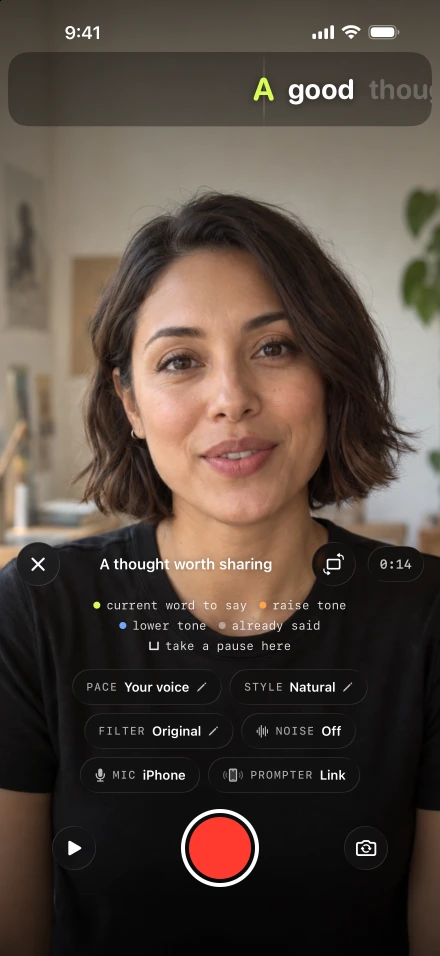
A fair test is one paragraph with a pause, an aside and a line you deliberately get wrong. Read it in both apps and watch the saved files: where the words picked up again, what the take kept and how much editing is left.