
Speak at your pace.
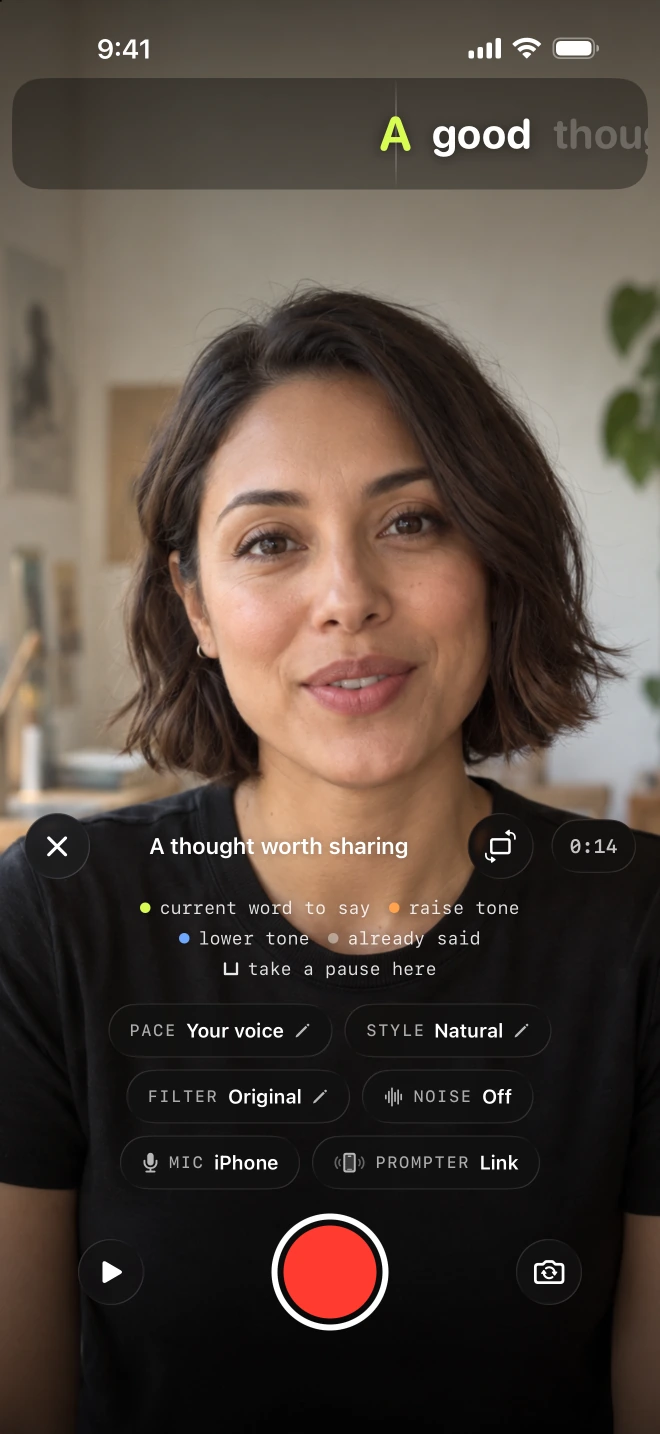
Keep your words close to the lens. Voice-following advances your written script as you speak and waits when you pause. Adjust the text to suit how you read.
Explore voice-followingEarly access · 100-tester beta
You have something worth saying. Lightshot helps you say it at your own pace, then turn the take into a captioned video. Try the iPhone studio before its App Store release and tell us what works for you.
iPhone · iOS 26.5 or later · No charge for TestFlight purchases

On your computer?
Scan with your iPhone camera.
Or open lightshot.pro/beta on your phone.
A working iPhone appInstall through Apple's TestFlight.
Your first video is the testNo technical experience needed.
Your feedback shapes the next buildTell us where it helps or gets in the way.
What you can try
Teach something, introduce your work or explain an idea. Bring a short script, or start with a few lines you would say to a friend.
Keep your words close to the lens. Voice-following advances your written script as you speak and waits when you pause. Adjust the text to suit how you read.
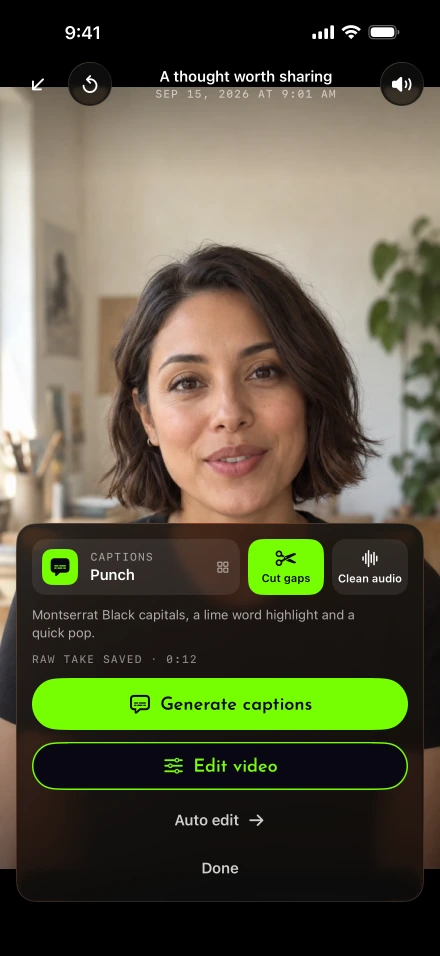
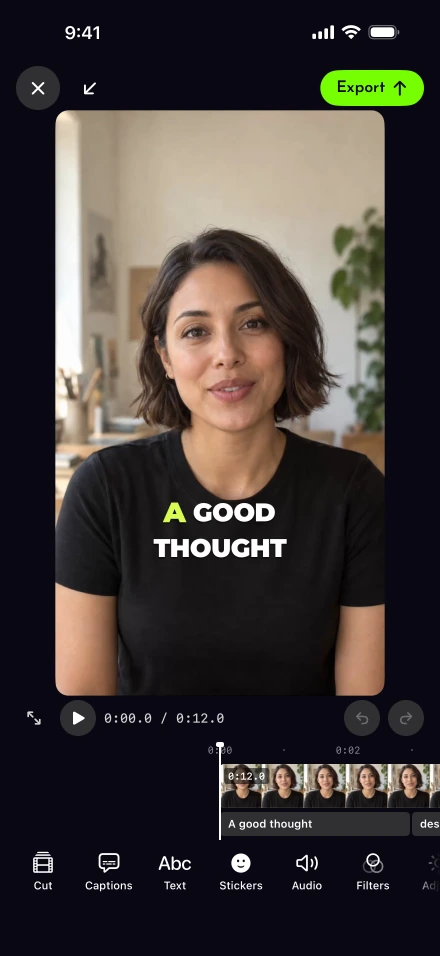
Explore voice-followingPause and redo a sentence during recording. Afterward, cut silences, reduce background noise and edit the take. Choose from 111 caption styles and adjust the words, look and timing.
Watch a real before and afterExport a captioned video, or connect a supported account to post or schedule from Lightshot. Background work can continue when iOS grants it permission, with a completion notice when notifications are allowed.
How background work behavesGet started
TestFlight is Apple's app for trying apps before release. Use your usual Apple Account. You do not need a developer account or a special test login.
Join the beta on TestFlightKeep this page open while you follow the steps.
On your iPhone, get Apple's free TestFlight app from the App Store. If it is already installed, go to step 2.
Get TestFlight from AppleCome back here and tap Join the beta on TestFlight. Follow the invitation into TestFlight, accept it and tap Install beside Lightshot.
Open Lightshot, follow the welcome steps and sign in with Apple or Google. Choose a plan to enter the studio. The purchase screen is part of the test: TestFlight purchases are not charged.
Check that Apple's purchase sheet identifies a test or sandbox purchase. Keep using the same Lightshot sign-in method when you return.
Write a few lines, record a 30-60 second take, add captions and export it. You can explore the full workflow without connecting a social account.
Your first test, step by stepKnow what you’re joining
This is a beta, so you may find rough edges. We want to understand how Lightshot works on your iPhone, with your voice and the videos you actually make.
Meet the makerScripts, voice-following, recording, retakes, captions, editing, noise removal and export. Connected publishing supports Facebook Pages, professional Instagram accounts and personal LinkedIn profiles.
Direct YouTube and TikTok publishing and follow-up comments are not enabled in this beta. You can export your video and upload it manually elsewhere.
Some tools need supported hardware or languages. Keep Wi-Fi available for uploads and avoid force-quitting during background work. Social posts are real, so check what you are about to share. Export recordings you want to keep before removing a beta build.
Your first session
A useful first test is one short video. A helpful report tells us what you tried, what you expected and what happened.
No. When you install Lightshot through TestFlight, its in-app purchases are test purchases in Apple's sandbox. The plans screen still appears because we need to test that flow too. Check that Apple's purchase sheet identifies a test or sandbox purchase. This beta is separate from the paid App Store release and does not promise permanent free access.
TestFlight subscriptions renew faster than normal subscriptions and eventually stop renewing. You may need to choose the test plan again. Lightshot also has a limited sandbox access window. If you cannot get back into the studio, contact support and tell us you are a beta tester.
Neither. If you have an iPhone and something you would like to explain on camera, you can help. You do not need an Apple Developer membership, and you can test recording, editing and export without connecting a social account.
This beta is for iPhone running iOS 26.5 or later. Check Settings, General, About to find your iOS version. There is no Android, iPad or web editor in this beta. Some intelligent features also depend on your iPhone model, language and downloaded models.
No. Facebook, Instagram and LinkedIn posts go to the real account you select. Review the destination, video and caption before posting. You can keep your testing local by recording, editing and exporting without connecting an account.
The invitation is initially limited to 100 people. This is a total invitation limit, not a live count of places left. TestFlight shows the current availability. If you cannot join, use the Lightshot news signup below for release updates or contact support if you need help.
Scripts, takes and edits are kept on your iPhone. Publishing or scheduling uploads the selected video to Lightshot's server to send it to the chosen platform. Export any recordings you want to keep before removing a beta build. Feedback you send through TestFlight, including attached screenshots, is shared with the developer.
Good thoughts. Your voice.
Try Lightshot, make something you want to share, and help us build a better everyday video studio.
Join the beta on TestFlightiPhone · iOS 26.5 or later · Initial invitation limit: 100 testers
Not ready to test? Get release updates below.